

01
Answers you can check
Every claim links to the exact passage it came from. Click a citation to open the original source. No vague summaries you just have to trust.
A Private AI Assistant For Your Own Files
Alambique Index turns your notes, books, and papers into something you can question in plain English, and every answer points straight back to the source it came from. It runs entirely on your own computer.
Nothing is uploaded, ever.
◇ Getting started
Install Ollama, a free app that runs AI models on your own computer. No account, no cloud sign-up.
Get the project onto your computer and start it up. It runs quietly in the background.
Tell it which folders of notes, eBooks, or PDFs to read, then ask your first question in plain English.
Comfortable installing a couple of free apps is all it takes — no monthly fee, no account to create. Full step-by-step instructions live in the GitHub repo.
◇ Prompt Tracer
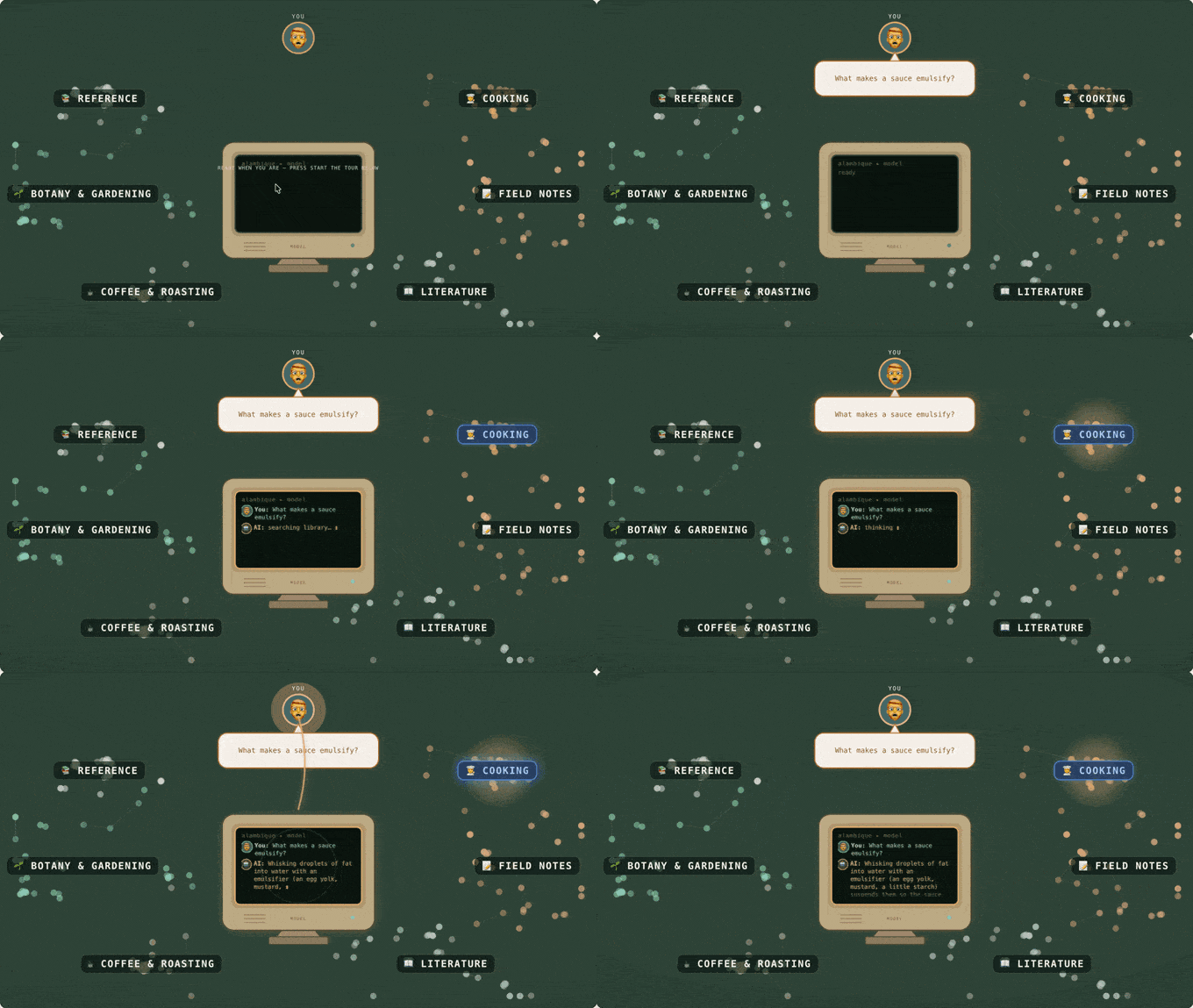
Every passage in your library becomes a point on a map, placed by meaning, so related ideas settle into topic clusters. You put a question to the model at the centre; it reaches into the clusters, pulls in the passages that fit, and answers you on screen — with citations. The recording below is the real thing, running in a browser tab; the full page lets you drive it yourself, step by step.
◇ Prompt Lab
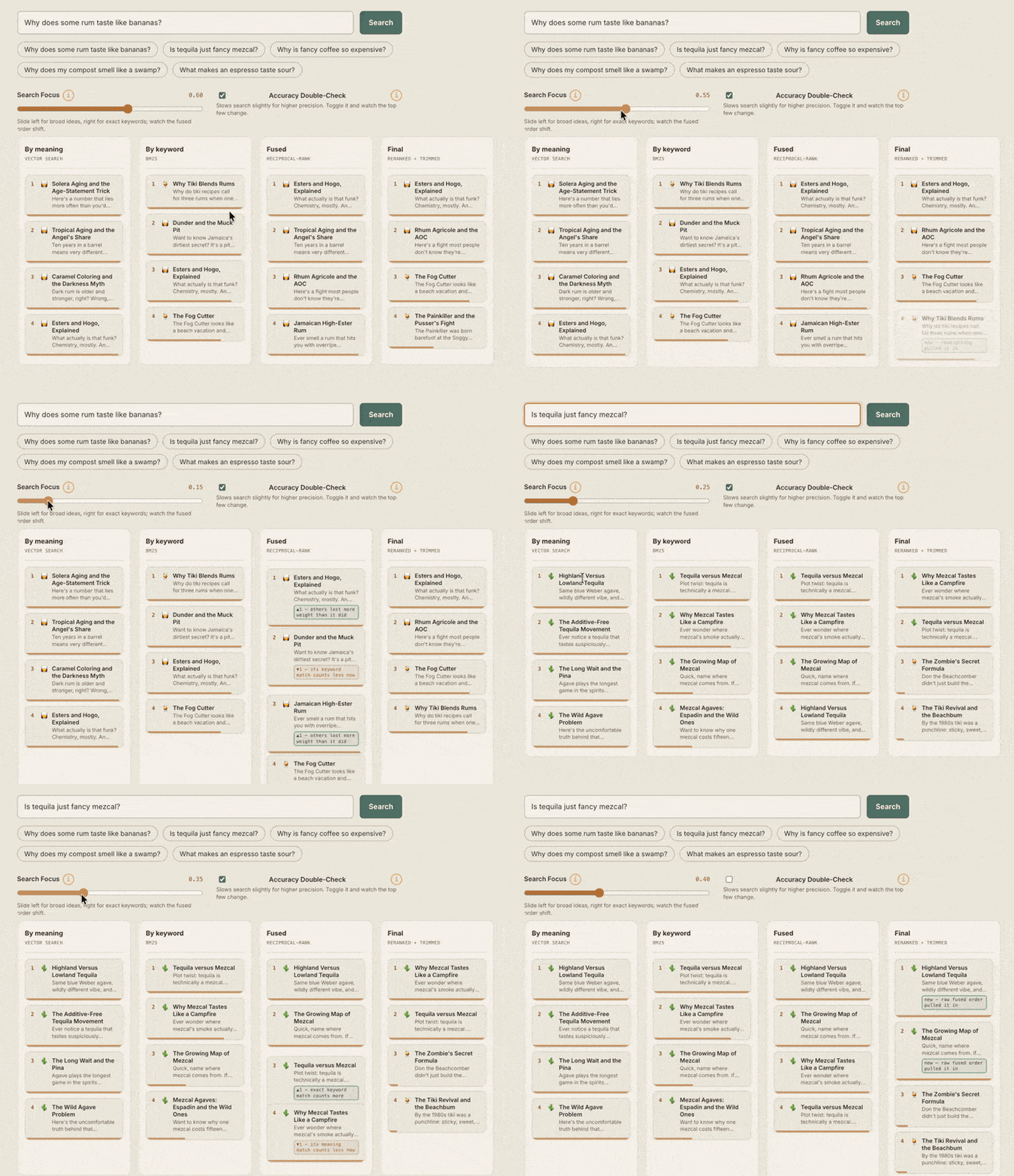
The Prompt Tracer shows the idea. The Prompt Lab hands you the controls: ask a demo library anything and watch hybrid retrieval rank the passages in real time. Slide keyword against meaning, flip the reranker, change how many results survive, and the order re-sorts as you watch. A miniature of the real engine, running entirely in your browser.
◇ Live library
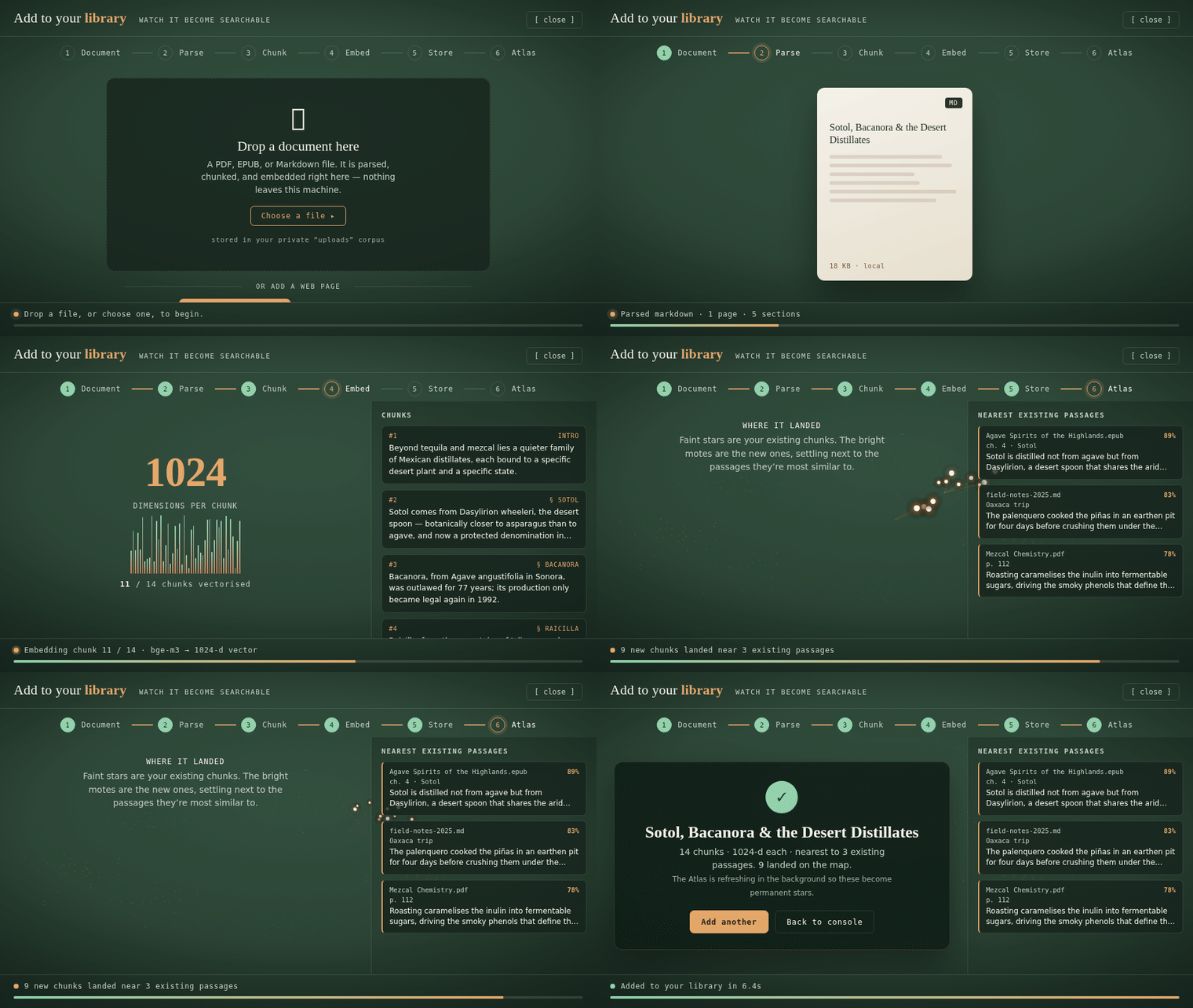
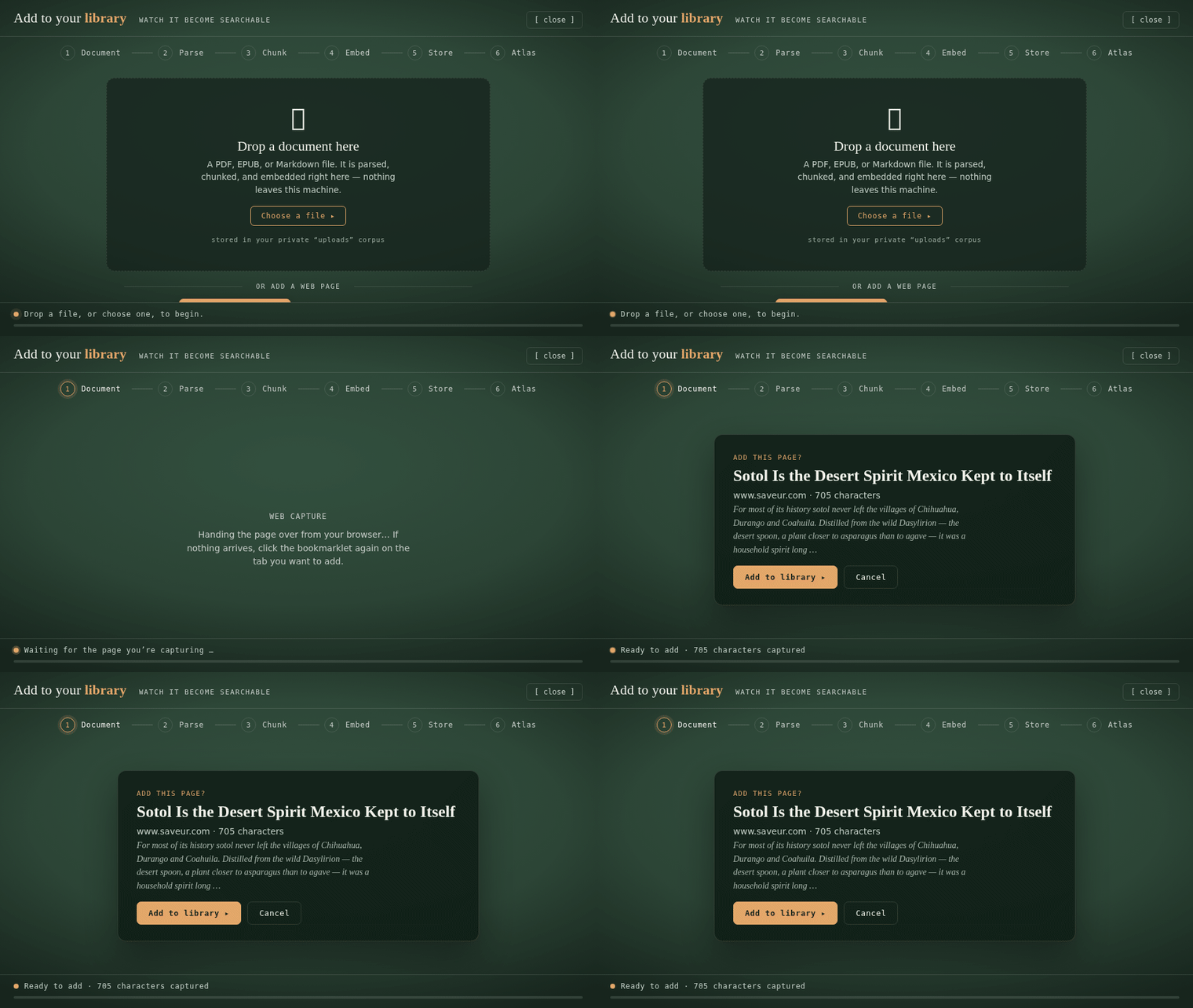
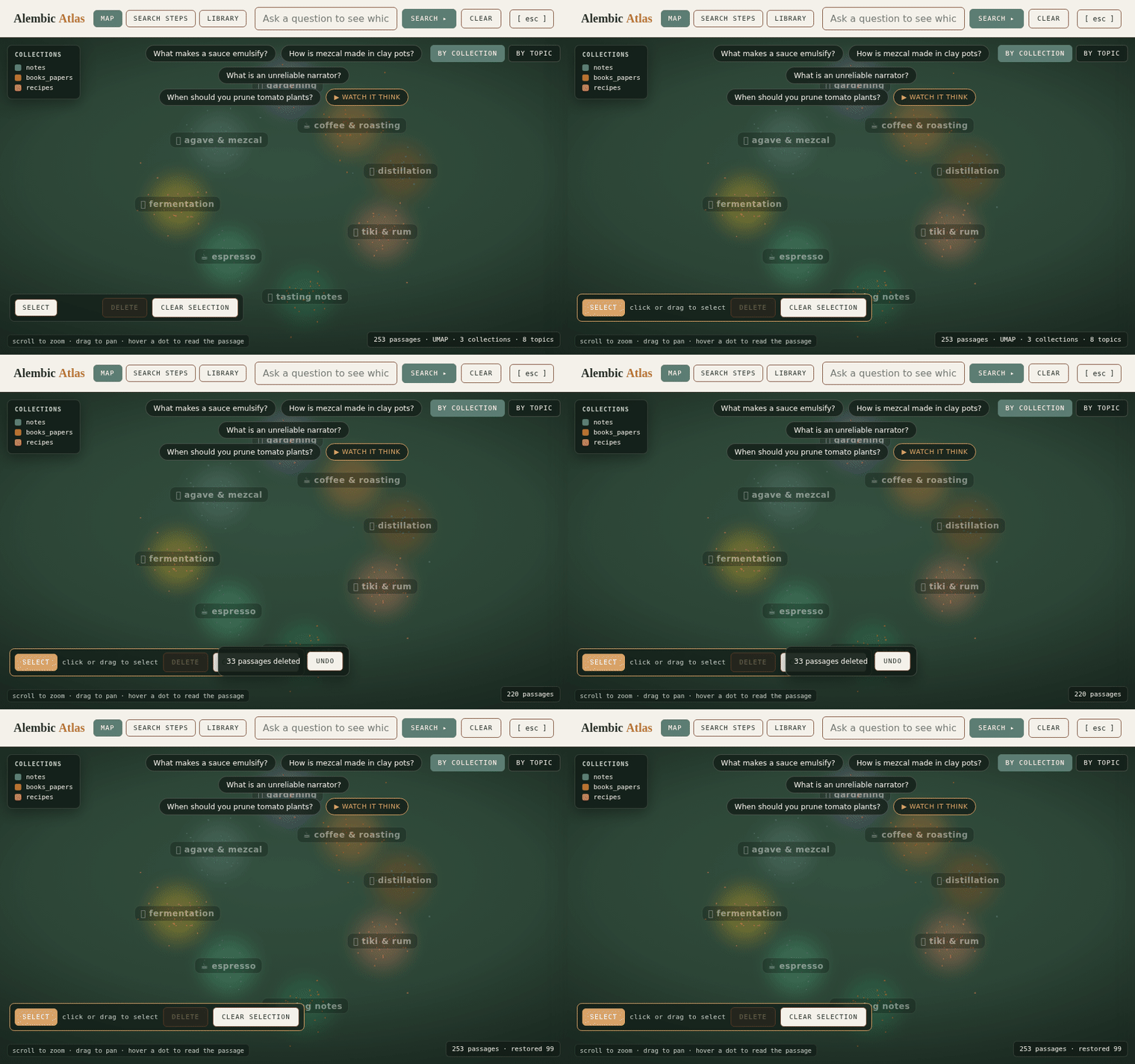
Drop in a PDF, eBook, or note and watch it get read, split into passages, turned into searchable meaning-vectors, and placed onto your map, live, and entirely on your machine. Clip a web page the same way, and prune the map whenever something doesn't belong.
A real file entering the index: parsed, split into passages, embedded, then settling onto the semantic map beside the passages it's most similar to. Nothing is uploaded; the whole journey runs on your machine.
◇ Use it anywhere
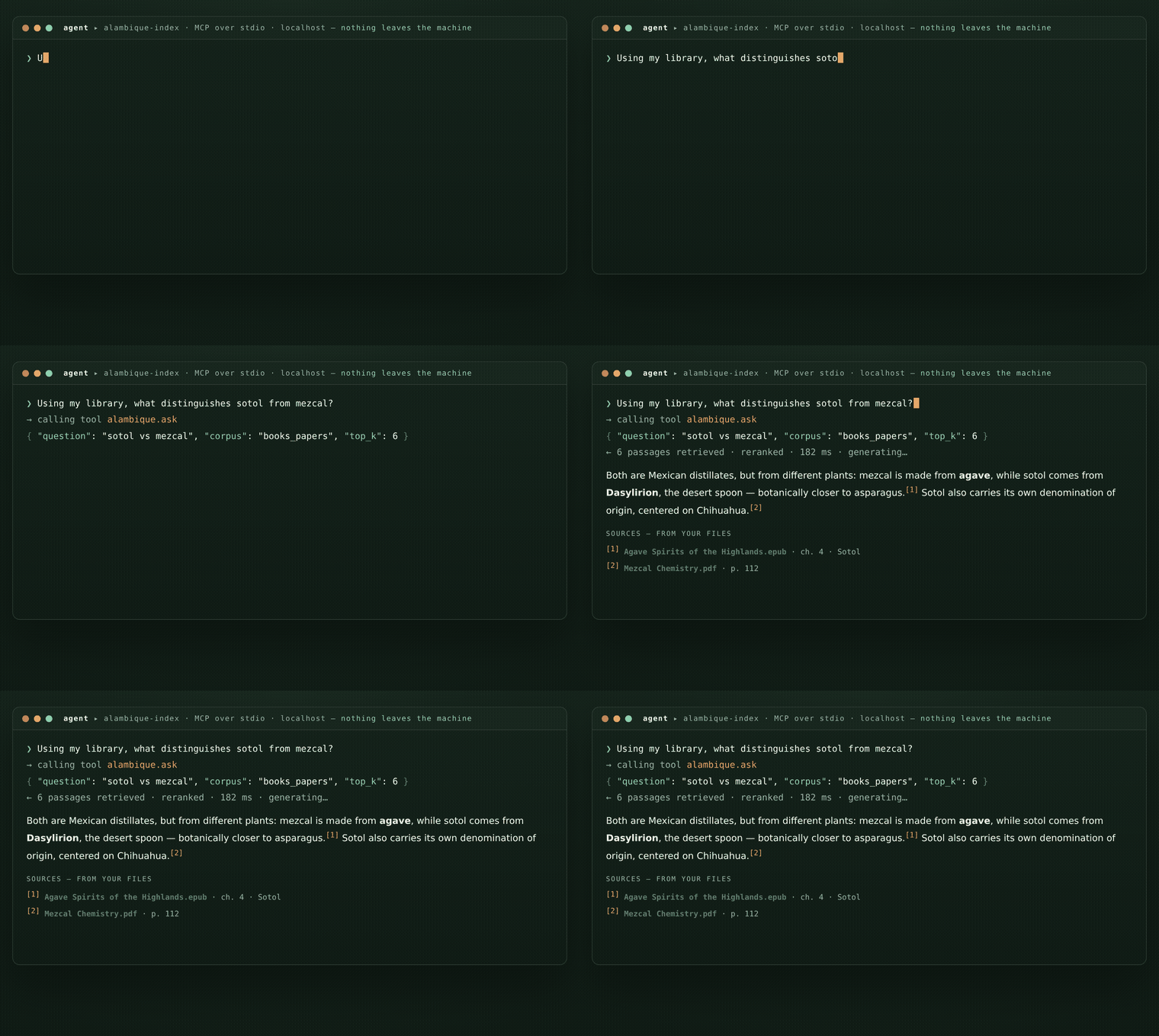
Alambique also runs a small local MCP (Model Context Protocol). A standard way for AI assistants to call outside tools. Alambique exposes ask and search over it, running only on your own machine, so an agent can query your library with no port opened and nothing sent to the cloud., so Claude, in Cowork, Code, or Desktop, and other agents can search your private library and get cited answers, without the web console open and without anything leaving your machine. It turns Alambique from an app you visit into something every AI session can quietly use.
◇ Retrieval quality
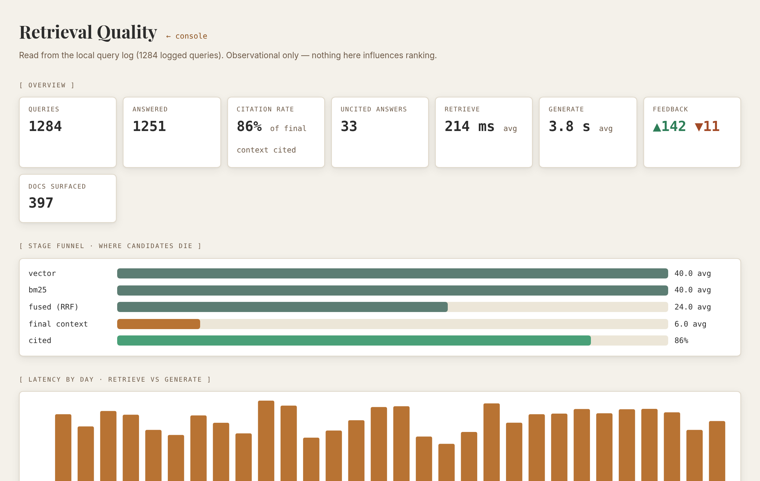
A local dashboard, read straight from your own query log, shows how often retrieved passages get cited, where search candidates drop off, which documents never surface, and how long each step takes. It's measurement for its own sake: private, on your machine, and never used to quietly re-rank anything behind your back.
[01] The problem
Years of notes and markdown files. A drive full of eBooks and academic PDFs. The passage you half-remember is in there somewhere, but keyword search doesn't understand what you actually meant, and the cloud AI tools that could help want you to upload your private library to someone else's servers first.
[02] What it is
Think of it as a Your question → the passages that fit → an answer, only from your files.Retrieval-Augmented Generation (RAG). The technical name for this approach: the AI first searches your own documents for relevant passages, then answers using only those, so replies stay grounded in your sources, not the model's memory.. You ask a question in plain English; it finds the passages that actually matter, reads them, and writes you a clear answer, with Every claim links to the exact source passage. Click to check it.Citations. Every claim is linked to the exact passage it came from. Click one to open the original text and check it for yourself. Nothing is taken on faith. straight back to the source. It doesn't guess, and it doesn't make things up.
The AI Your files and the AI stay on your computer. Nothing goes out.Runs locally. The AI models run on your own machine through Ollama (free software, no account, no cloud). Nothing is ever sent to someone else's servers., both the part that Large Language Model (LLM). The kind of AI that reads and writes text. Here it only answers from the passages pulled out of your files. and the part that Embedding model. Turns each passage into a list of numbers that captures its meaning, so search can match by idea, not just matching keywords.. Your reading and your questions never leave your machine.
Tip: hover, tap, or focus any underlined term for a plain-language explanation. Bigger question? See the FAQ.
↳ In plain terms
It answers only from what it just found in your files, not from the open internet, and not from whatever it picked up during training.
[03] Features
Every claim links to the exact passage it came from. Click a citation to open the original source. No vague summaries you just have to trust.
The AI runs on your own machine, and the app is Local-only. The models run on your machine and the app answers only to your own computer (technically, it binds to 127.0.0.1). It's never exposed to your network or the internet.. Your PDFs are PyMuPDF. A tool that extracts the text from your PDFs on your own machine. No file is ever sent to a cloud service., never uploaded anywhere, and your search index is only ever touched locally.
It understands what you meant, even if you don't remember the exact phrase, while still catching exact names, codes, and quotes. A quick second pass then double-checks the top matches, so the passages that actually answer your question land first.
Notes, markdown, eBooks, and academic PDFs, even A scanned, image-only page → searchable text.OCR (optical character recognition). Reads the text out of scanned, image-only PDFs, done on your own machine with Tesseract., read on your own machine. Long files are A long file → passages, so it can quote the exact part.Chunking. Documents are split into passages along their natural structure, so the system can fetch and quote the exact part that answers you, not a whole file. along their natural structure, so it can quote the exact part that answers you.
Your notes, your books & papers, and your recipes live in separate collections, so a recipe never sneaks into a research answer. Choose which one to search for each question.
Answers appear as they're written, so you're never left staring at a spinner. Follow-up questions understand what came before, so "and what about the second one?" just works.
Pin the passages and answers you want to keep, edit them in place, and export to a plain-text document. A research session becomes a first draft without ever leaving the page.
Swap the AI models anytime through one simple settings file, no code changes required. It's also built to move from your laptop to a home server later, without starting over. See the full stack ↓
Add a PDF, eBook, note, or a whole web page right from the console and watch it get read, split, and indexed on the spot, then curate the map by deleting passages you don't want. See it happen ↓
A local connection lets Claude and other AI agents search your library and get cited answers, without opening the console and without anything leaving your machine. Use it from an agent ↓
A private dashboard shows how often answers cite their sources, which documents never surface, and how fast each step runs, so you can see and improve retrieval quality. See the dashboard ↓
[04] How it works
Your computer does just two things: run the AI and copy your files down from the cloud. Everything else (reading the files, organizing them, and searching) happens in a sealed workspace that never opens to the internet.
Notes, eBooks, and PDFs you already own.
Files are downloaded out of iCloud into a local read-only staging copy.
Read each file, split it into passages, and turn each into a Embeddings (bge-m3). The open model that turns each passage into numbers capturing its meaning, so search can match by idea..
Vectors land in a local Chroma. The local database that stores the meaning-vectors and returns the closest passages. index on disk.
Keyword and meaning search, combined, then double-checked by a reranker.
qwen3:30b-a3b. The local large language model that reads the retrieved passages and drafts the cited answer. reads the passages and drafts an answer.
Streamed back with every claim linked to its source chunk.
No step in this chain reaches the public internet.
[05] Stack
For developers & power users: the exact engine underneath, and how to swap any piece of it. Everything above this point is the full picture for everyone else.
The conductor that wires every step together: loading your files, splitting them into passages, running the search, and handing the results to the model.
No cloud parsers, local parsing only.
Turns each passage into a list of numbers that captures its meaning, so search can match by idea rather than exact wording. Each passage becomes a point in "meaning space," and so does your question; search returns the nearest points.
1024-dim · swappable in config
The local language model that reads the retrieved passages and writes your answer, citing each source as it goes.
Runs natively on Apple Silicon (Metal)
The database that holds those meaning-numbers and instantly returns the passages closest to your question.
Searches two ways at once: exact keywords and meaning, then merges both into a single ranked list of passages.
A second, more careful pass that re-reads the top passages against your question and pushes the best matches to the top.
Pulls clean text out of your files, even reading scanned, image-only PDFs by recognizing the words on the page.
Image-only PDFs OCR'd locally, hash-cached
A small local web server so a browser page (or the command line) can talk to the engine on your machine.
The machine it's built and tested on, with enough memory to run the models comfortably and no cloud GPUs.
Host-direct, no Docker
Where it's headed: the same app moved to a home server and reached privately, by changing settings, not code.
No code changes required
[06] Field notes
Local parsing is enforced, not optional. The cloud document parser was ruled out from the start, the models stay on localhost, and the container exposes no ports. Privacy you can toggle off isn't privacy.
SQLite-backed Chroma threw disk-I/O errors across the macOS↔Linux file boundary. The index now lives where the database engine is actually happy. Caught in a smoke test, not in production.
Model endpoints and the vector store are config-driven, so the jump from a laptop to a self-hosted server changes a YAML file, not the code.
Over-fetch, cap chunks per document, then rerank with a cross-encoder. Six sharp passages beat twenty fuzzy ones when the model has to cite what it used.
[07] FAQ
Nothing is uploaded, ever. The AI and your files both stay on your own computer, and the app is never exposed to the internet or your network. Your documents and your questions never leave your machine.
Once it's running, no. You just ask questions in plain English. Getting it set up does take a little comfort with installing developer tools (a one-time install of the free Ollama app and the project itself). It's an open personal project, so setup is hands-on rather than one-click for now.
Cloud assistants answer from what they absorbed during training and run on someone else's servers. Alambique Index answers only from your files, links every claim back to the exact source, and runs entirely on your own computer. Nothing is uploaded.
Notes and markdown files, eBooks (EPUB), and PDFs, including scanned, image-only PDFs, which it reads by recognizing the text on the page. You point it at folders you already have; there's nothing new to write.
No. It's free and open source, and it uses free, open AI models that run on your own machine. There's no subscription, no per-question fee, and no account to create.
It's built specifically to avoid that. It answers only from the passages it pulled out of your files, and cites each one so you can click to verify. If your files don't contain the answer, it tells you rather than inventing one.
Yes. Drop a PDF, eBook, or note straight into the console and it's read, split, embedded, and added on the spot, no full re-index. You can also clip a web page with a one-click bookmarklet: the text is read in your browser and you confirm before anything is saved. Both stay entirely on your machine.
Yes. Alambique runs a small local connection (an MCP server) that lets Claude, in Cowork, Code, or Desktop, and other agents search your library and get cited answers, without opening the web console and without anything leaving your machine. It's the same private index either way.
It's built and tested on an Apple Silicon Mac (M-series) with enough memory to run a local model comfortably (roughly 16 GB or more). The models run through Ollama, which also supports Windows and Linux, so it can be adapted, but the current build targets macOS.
A local language model writes the answers, and a separate model powers meaning-based search; both run locally through Ollama. Every model, plus the search database, is set in one simple settings file, so you can swap in different ones without touching the code.
On your own disk. Your files are read locally, the search index is saved in a local database on your machine, and none of it is sent anywhere. Delete the index folder and it's gone completely.
Yes. The full source is on GitHub. In short: install Ollama and pull the models, clone the repo, point it at your folders, and run it locally. See the GitHub repo for step-by-step instructions.
Yes, it's designed to move from a laptop to a self-hosted server (for example, Unraid with Docker, reached privately through a Cloudflare Tunnel) by changing a settings file, not the code.
Alambique Index is a personal project, built in the open. Clone it, point it at your own files, and ask your library something.